Behind the ink
What Makes a Good Photo for a Personalized Comic (and What to Avoid)
5 min readThe Hero Ink
Updated
The short answer
The best photos for a personalized comic are one to five recent, front-lit photos where the face fills a good part of the frame, eyes are visible, and you show a couple of different angles. Skip sunglasses, heavy filters, group shots and screenshots, and mention details like glasses, freckles or tattoos in the notes.
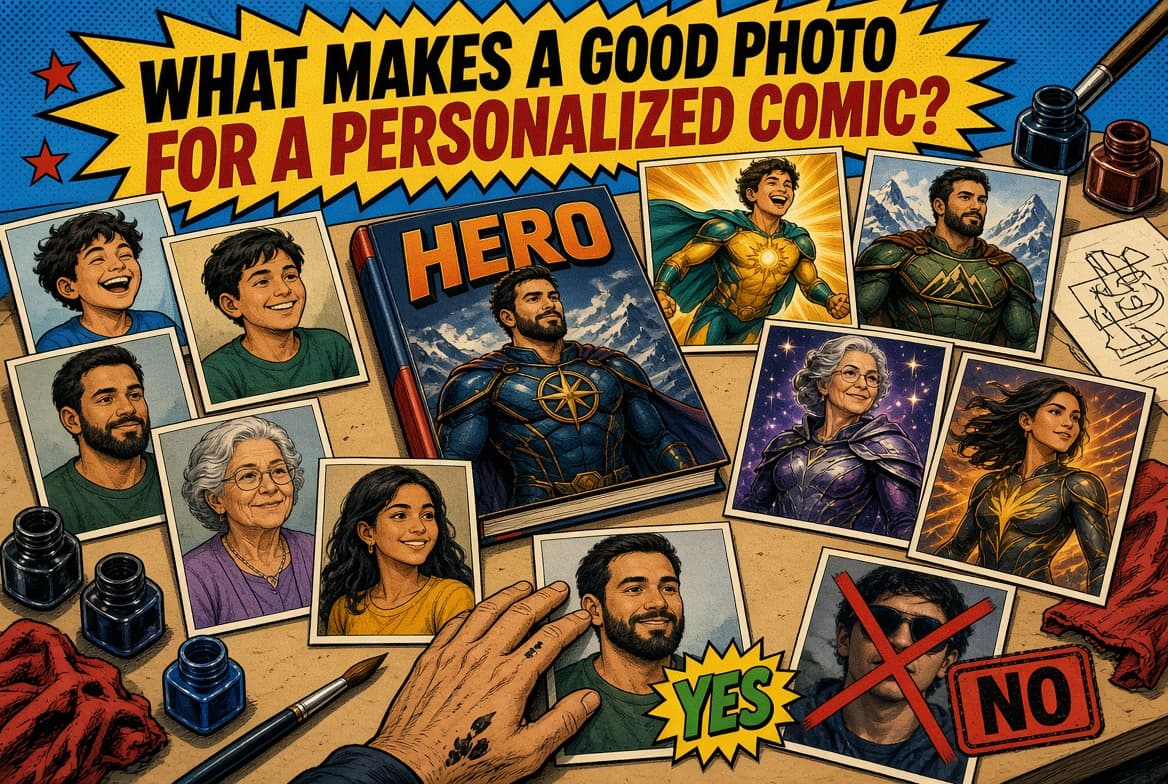
The single biggest factor in whether a personalized comic looks like the person is the photos you upload. Not the art style, not the story, not the package. The photos. Here's what actually helps, and what quietly makes the job harder.
What works
- Faces lit from the front. Window light beats overhead light beats flash.
- Eyes open, looking roughly at the camera, in at least two or three of the shots.
- A few different angles — straight on, three-quarter, one where they're smiling properly.
- Photos taken in the same era. A face changes; a mix of 2015 and last week pulls the likeness in two directions.
- Close enough that the face fills a decent part of the frame.
What makes it harder
- Sunglasses, heavy hats, and hands over the face.
- Deep shadow across one half of the face — dramatic in a portrait, ambiguous in a reference.
- Group shots where your hero is one of six small faces in the back row.
- Heavy filters and beauty smoothing, which erase exactly the features that make someone recognizable.
- Very low-resolution screenshots or photos of photos.
How many to send
Three to five good ones beats a pile of mediocre ones (the upload takes up to five). More photos of the same pose adds nothing; two more angles adds a lot. If you only have one usable photo, that’s still workable — just expect the likeness to lean on that single angle throughout.
A quick test before you upload
Shrink the photo down to about the size of a postage stamp on your screen. If you can still tell instantly who it is, it's a good reference. If it becomes an anonymous smudge, it will be one to the artist too.
About the details you actually care about
Scars, freckles, a particular pair of glasses, the gap in the front teeth, the tattoo on the left forearm — those are the things people notice first in the finished book, and they're the easiest to miss from photos alone. Mention them in the notes field. It takes one sentence and it's usually the detail that gets the biggest reaction.
A 60-second checklist before you upload
- Pick one to five photos from the last year or two.
- Make sure at least two are lit from the front with eyes open.
- Include one smiling and one three-quarter angle.
- Drop anything with sunglasses, filters or a crowd.
- Run the postage-stamp test on each one.
- Note glasses, facial hair, freckles, scars or tattoos in the notes field.
What happens to the photos afterwards
Photos are stored encrypted, used only to create your comic, never used for training or marketing, and deleted automatically 90 days after delivery. You can request earlier deletion any time. Full details are in the privacy policy.
New to this? Here is how a custom comic gets made, start to finish, and what each package includes. Making a personalized novel instead? It uses one to five photos the same way, for the illustrated cover portrait.
FAQ: photos for a personalized comic
- How many photos do I need for a personalized comic?
- One to five. Three to five clear photos from different angles give the best likeness; one good photo still works.
- Can I use old photos?
- You can, but keep them from the same era. Mixing photos taken years apart pulls the likeness in two directions. If the comic is meant to show them as they are now, use recent photos.
- Do phone photos work?
- Yes, phone photos are perfect. Front-facing window light works better than overhead light or flash.
- What if they wear glasses?
- Include photos with their usual glasses on and mention them in the notes so they appear in the comic. Avoid sunglasses, which hide the eyes.
- Which file types can I upload?
- JPEG, PNG, WebP or HEIC, up to 15 MB each.
The thing people point at is almost never the cape. It's the glasses, or the hair that never sits right, or the one crooked smile.
Photos picked out? The upload step takes about two minutes.
Start your comic